CSV and Excel uploads, data snapshots, and input identity
Source:vignettes/articles/01-uploads-snapshots-input-identity.Rmd
01-uploads-snapshots-input-identity.RmdThe Data step reads one CSV or Excel file into an in-memory study-data provider, checks the supported upload structure, and pins a content-verified snapshot. Later revisions retain the selected analysis records and input identities. These mechanisms identify what was read and executed; they do not establish synthetic provenance, de-identification, or full ADaM conformance.
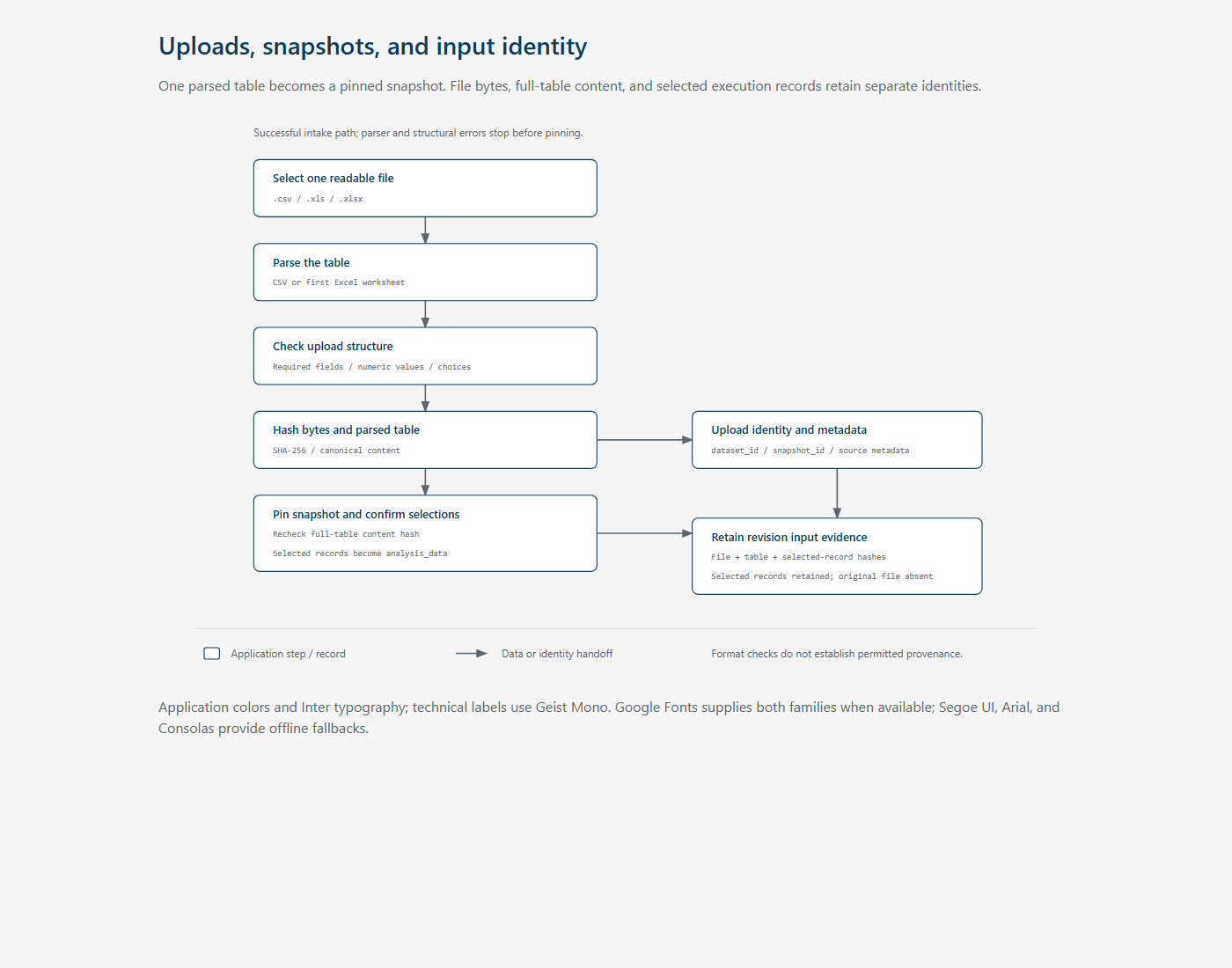
The diagram shows the successful intake path and the distinct identities carried into revision evidence. Parser and structural errors stop that path before a snapshot is available.
Reading a file
mod_plot_generation_server() accepts one readable file
with a .csv, .xls, or .xlsx
extension. .uploaded_study_data_provider() uses the
basename of the supplied filename and chooses the parser from its
extension. CSV uses
utils::read.csv(check.names = FALSE, stringsAsFactors = FALSE).
Excel uses readxl::excel_sheets() and reads the
first worksheet with minimal column-name repair. There
is no worksheet selector or automatic combination of worksheets.
The adapter requires at least one row and column, with unique,
non-empty column names. It requires USUBJID,
PARAMCD, PARAM, AVISIT,
AVISITN, AVAL, and AVALU, plus a
treatment variable matching ^TRT(A|P|[0-9]+[AP])$, such as
TRTA, TRTP, or TRT01A.
AVAL and AVISITN must be numeric. The data
must contain selectable parameter codes, parameter names, units, visits
with finite visit numbers, and treatment levels.
These checks establish initial compatibility. Selected-record validation occurs later, after the scientist confirms plotting choices; see BDS profiling and plotting eligibility. A file can pass intake while a particular selected subset remains unsuitable for plotting.
On upload, the module clears the previous loaded-file state and catches parsing or structural errors for display. A successful load also resets the current assurance revision. Forward navigation to Ask or Confirm requires the loaded temporary path to match the current file input. That navigation check compares paths; it does not rehash file bytes on each click.
Three identities with different purposes
| Identity | Construction | Meaning |
|---|---|---|
source_file_hash |
SHA-256 digest of uploaded file bytes | Identity of the supplied CSV or workbook, including content outside the selected Excel worksheet |
content_hash |
study_data_content_hash(data) |
Identity of the parsed full table after canonical normalization |
Execution snapshot_hash
|
canonical_hash(profile$selected_data) |
Identity of the selected records actually supplied to the execution request |
study_data_content_hash() sorts columns by name and
sorts rows using stable text keys. Its payload retains column names, R
storage types, classes, missing values, and values. Row or column
ordering alone therefore does not normally change the full-table
identity. Parser-inferred types remain part of identity: matching
displayed values do not guarantee matching hashes between CSV and
Excel.
The upload adapter hashes a list containing content_hash
and source_file_hash to create a snapshot key. The first 16
hexadecimal characters form upload-… and
snapshot-… identifiers. Both full hashes remain available
separately; the shortened identifiers are references, not the complete
integrity evidence. Renaming a byte-identical file does not enter this
key, although its basename is recorded as source metadata. Reordering
CSV rows can preserve the table hash while changing the file hash and
both shortened identifiers.
canonical_serialize() sorts named list elements
recursively before JSON serialization; canonical_hash()
hashes that serialization. The selected-record execution hash uses this
generic serializer rather than the full-table normalization routine.
Consumers must compare like identities instead of substituting
content_hash for execution snapshot_hash.
Pinning and retaining input
pin_study_snapshot() requires exactly one matching
dataset identifier in the provider manifest. It reads the provider’s
data and recomputes the full-table hash, rejecting a mismatch. The
returned study_data_snapshot contains normalized data,
snapshot and dataset identifiers, declared keys, metadata version, BDS
designation, and permitted treatment-variable names. Upload metadata
uses uploaded-bds-v1 and declares USUBJID,
PARAMCD, and AVISIT as keys; declaring these
keys does not itself check their uniqueness.
The direct-upload provider closes over the parsed table. Pinning
reads that in-memory table rather than rereading the temporary upload.
.create_assurance_candidate() pins it again and attaches
source metadata. The separate local_study_data_provider()
reads governed synthetic RDS fixtures and their manifest; those fixtures
carry classification metadata, unlike direct uploads.
.revision_context_details() records the full-table
identity, selected-record identity, source basename/type/worksheet/file
hash, selected column names and classes, and selected records. This
supports later replay without requiring the original temporary upload.
It does not archive the original CSV or complete Excel workbook.
Snapshot pinning provides a verified value at read time; R lists and
data frames are not a write-protected storage mechanism.
Enforcement and current limits
The upload path stores no classification.
validate_bds_profile() allows this absence when source
metadata identifies direct_upload; the execution service
uses a synthetic classification default. Neither behavior verifies
provenance or removes identifiers. The task-first
workbench learning records the synthetic-only POC intent. Strategy
permits public, synthetic, or properly de-identified data. This
unresolved policy difference does not change the inspected runtime
behavior.
Source and inspected coverage
-
Upload
module:
.uploaded_study_data_provider(),mod_plot_generation_server(). -
Snapshot
contract:
study_data_content_hash(),pin_study_snapshot(); local provider:local_study_data_provider(). -
Serialization:
canonical_serialize(),canonical_hash(); coordinator:.create_assurance_candidate(); retained evidence:.revision_context_details(). -
Provider
tests cover local catalog metadata, classification, row-order
invariance, unauthorized dataset identifiers, and content mismatches. Module
tests cover workflow layout and navigation. No direct parser
assertions for
.uploaded_study_data_provider()were found in the inspected test tree.
These tests were inspected, not executed for this documentation change. Browser upload behavior and parser edge cases remain unverified here.